 Introduction
Anyone who is familiar with Asus' products will be familiar with the Transformer concept. The new Asus Transfomer Pad is here to challenge the dominance of the iPad Air, as well as the Sony Xperia Tablet Z and Google Nexus 10.
The key to the popularity of the Asus Transformer Pad series has been the keyboard docking station, and that's present here too - allowing it to double up as a mini-netbook.
Microsoft has taken massive strides in this area with the Surface 2 coming with an extra keyboard case, so Asus really needs to up its game if it wants to keep up with the big boys.
Taking a look at the new Transformer Pad you'd struggle to see anything different between it and its brethren. At 263 x 180.8 x 8.9mm it is only 0.4mm deeper than the Transformer Pad Infinity.
It is 13g lighter, however, weighing in at only 585g. Adding the keyboard dock takes the Transformer Pad to 1155g, although it doesn't feel significantly heavy when popped into a bag.

Asus' device is significantly larger than the iPad, although the Transformer Pad comes with a 10.1-inch screen, making it 0.4 inches bigger.
A 2560 x 1600 WXVGA screen is higher resolution than both the Transformer Pad Infinity and the iPad Air, even dwarfing the Retina Display's 264ppi at 299ppi.
Behind that screen sits a 1.9GHz quad-core NVIDIA Tegra 4 processor (the Tegra 3 is in the Infinity) backed up with 2GB of RAM, as well as 32 or 64GB of internal storage. Asus also offers 5GB of cloud storage for life.

Asus has also equipped the Transformer Pad with the same impressive battery that has come with all Transformer Pads. The 31Wh power pack in the tablet provides up to 13 hours of use, with the 16Wh dock providing a further four hours.
Other key specs include the 5MP rear camera so you can show everyone that you're photographing something, 1.2MP front sensor, microSD support up to 128GB and a micro HDMI port.
The keyboard dock also provides further support with a USB 3.0 port and a full sized SD card slot.

To make use of all that hardware, the Asus Transformer Pad comes with Android 4.2 Jelly Bean, although Asus has pushed out an update to Android 4.3.
Looking at the undocked tablet, there is nothing that particularly stands out. The thick black bezel and large screen are reminiscent of almost every tablet I've seen. The front camera sits at the top of landscape mode, making it easier to make video calls when docked.
On the back of the aluminium chassis is the power/lock button and the volume rocker, as well as the 5MP camera, while a microSD slot, 3.5mm headphone jack and micro HDMI port sit on the left hand side, leaving the right completely bare. The base holds the charger port, as well as slots for the keyboard dock to lock into.

When the Asus Transformer Pad is docked, the tablet becomes an Android netbook. The SD slot and USB 3.0 port sit on the right, leaving the dock charging port on the left. Asus has created a really good dock, and although it feels small it doesn't feel cramped. The dock also comes with a trackpad, meaning you don't have to keep tapping the screen.
Every button that you could hope for is there, including buttons to control various connectivity options, brightness, media controls and a screenshot key. Android's home button occupies the space where the Windows/Command button is usually found.
Overall, Asus has taken what has kept the Transformer Pad series so good, and improved it. The screen is bright and the resolution leaves nothing wanting.
Interface
The Asus Transformer Pad comes equipped with Android 4.2 Jelly Bean out of the box, although there is an update available to 4.3.
As with all previous Transformer iterations, Asus has left Google's OS pretty much untouched. This might be seen as a good thing, but I would liked to of seen a little more customisation.
Without the dock, the Transformer Pad feels like another generic Android tablet, albeit running smoothly with the 1.9GHz quad-core Tegra 4 CPU underneath it.
This means that it functions in the same way as every Android tablet, with the multiple home screens being able to be populated with folders, apps and widgets.

There are a few proprietary widgets on the Asus Transformer Pad, including battery, email, weather and task manager. Apps and widgets can be dragged and dropped out of the app drawer, and onto one of up to seven home screens.
Creating folders is incredibly easy, aping the iOS method of dragging and dropping apps onto one another. This is a brilliant feature, especially when you compare it to Samsung's manual creation method which feels far more convoluted.
Working with it as a netbook, however, these home screens feel a little redundant, more applicable to an undocked slate. The dock certainly makes manoeuvring the Transformer Pad easy, with the touchpad being sensitive as well as supporting multi-touch gestures to move between screens.

Android's notifications bar swipes downward into a narrow area down the centre of the screen. Quick settings make an appearance, allowing quick toggles of Wi-Fi, battery optimisation, a reading mode, instant dictionary, Bluetooth and GPS.
Wi-Fi settings, audio settings and a Miracast wireless display can also be accessed, alongside the main settings button and a brightness toggle.
This is an area that confused me greatly. On full brightness the screen is usable inside but is incredibly difficult to use when out and about, leading me to leave the screen up to maximum all the time. Auto-brightness mode didn't help, as the screen got slowly darker and darker.

With Microsoft now making deep inroads into the tablet market with the Surface 2 and Windows 8.1, it is quickly becoming clear that Android is not the right OS for productivity.
This is remedied to an extent, but the inability to snap apps side by side in the same way as Windows 8 or on Samsung's TouchWiz UI is sorely missed. With the notifications bar at the top, persistent on-screen buttons for home, back and multi-tasking are sat at the bottom.
The bottom left also holds a small triangular button for access to 'floating' apps, such as a calculator or dictionary. When selected, these appear over any app you have running so there is no need to open an app separately.
Messaging and keyboard
Keyboard
When it comes to messaging, the Asus Transfomer Pad comes into its own. The on-screen keyboard is easy to use, although it fades in comparison to the keyboard dock.
The wide range of Bluetooth keyboards that are available online is testament to the fact that people increasingly want a physical input to type out their missives.
For those that want to use their tablets as a communication tool, adding the keyboard makes typing a lot easier, although the small size can make things a little difficult.

Having a full-sized keyboard would be great, but would heavily detract from the unified feel that the existing dock provides. A Bluetooth keyboard would work well, but this would similarly affect portability.
The compromise is a keyboard dock that feels small, and means that you will have to accept that you will hit the wrong key a few times. This will change over time, as I found that the more I used the keyboard, the more accurate I got.
It may be small but it's fully featured. Every key that you could wish for is on the dock, including the full qwerty keypad, shift and caps lock keys, and all the numbers across the top.
Messaging
Messaging is covered with the Gmail and Email apps, and there is no surprise to which Asus wants you to use.
The Email app not only sits on the home screen dock, but is also built to include Google's email accounts. Multiple accounts are catered for, with the ability to view each one separately or in a combined view.

For those that use their Google account as their primary email, the Gmail app is a far better choice. It includes the ability to file away under both the Social and Promotion inbox, as well as having the same labels features that are so popular on desktop version.
Gmail also allows the Transformer Pad to receive mail via push, whereas the email app can refresh itself no more than every 15 minutes.
Internet
As with nigh on every Jelly Bean device, the Asus Transformer Pad includes both Chrome and a native browser. This leads me to again point out that which browser you use is entirely down to your personal choice.
The big bonus with the Transformer Pad is that high-res screen, which helps keep everything clean and tidy. As I pointed out earlier though, this is not so useful when out and about as the screen isn't bright enough to see in the great outdoors.
When it comes to choosing the browser, there is pretty much nothing in it. Asus hasn't provided the same level of customisation that I've seen on other devices, with the native browser very much appearing as Chrome with a different colour scheme.
Chrome does a far better job of managing your online lifestyle between devices, allowing for a far more seamless transition between desktop and mobile, although this point is almost rendered moot with the dual purpose of the Transformer Pad.
Bookmarks are managed well in both cases, pulling them all in from the Google account that you have signed into. The native browser is a little more attractive as it pulls in little thumbnails once you've visited them. Chrome makes it feel more like a folder.
It is also a little easier to access them in the native browser, tapping the star icon. In Chrome you have to go via the menu. There is a bookmarks page at the bottom of the new tab screen, though.
The biggest difference I found between the browsers is that the native will reflow text, to a certain level. This means that you can pinch and zoom in, and the Transformer Pad will adjust it so it all fits on the screen.
Double tapping on Chrome has the same effect, although the extent of reflow is much narrower, and it won't pinch and reflow.
You can also quick access the Asus app by tapping on the right button on the dock, although I didn't find myself pushing the button very often.
NVIDIA's quad-core CPU coupled with 2GB RAM keeps everything running relatively smoothly, there wasn't anything that I found to be a hindrance. If anything, the biggest problem was the lack of brightness in the screen, meaning that it was hard to use the Transformer Pad out and about.
Wi-Fi is supported to 802.11 a/b/g/n, with Bluetooth also supported to the 3.0 standard. The Transformer Pad doesn't support 3G or 4G LTE, so maybe the screen won't prove to be a hindrance to many after all.
Media and apps
Media
With such an awesome screen resolution, you might feel that the Asus Transformer Pad has been geared rather heavily towards playing media. The support for 128GB microSD card and a micro HDMI port only help to confirm this.
That seems to be where the Transformer Pad stops, however. Asus seems to have other ideas, with the keyboard dock being the biggest clue that the Transformer Pad was definitely geared up to be more of a productivity device.
I wonder if Asus has missed a trick here, because the portability of the Transformer Pad makes it ideal for sitting on the commute, watching a HD movie. The superb battery life will cope with any journey too.
The lack of a dedicated music or video player means that you will have to search the Google Play Store to find a third party offering or instead rely upon Google's standard Play offerings.

Being Android, Play Music and Play Movies apps both come installed. I've always seen these as a way for Google to push its own download and streaming services, but both apps double up as media players.
Browsing Play Music is simple and easy, with large album artwork to make selecting the right music easy. Music plays, with the controls appearing at the bottom of the screen.
One of the bigger advantages of the keyboard dock comes into play while playing music and browsing the Transformer Pad. Dedicated media keys allow you to play/pause and skip music tracks without having to load the music app, much like on a real laptop.

The Play Movies app is very similar, allowing you to browse via thumbnails. The media playback controls are hidden, allowing a full screen view. Tapping the screen allows manual searching of the video, and play/pause.
Fortunately, a Gallery app does come preinstalled, bringing up large tiles of photographs from the Transformer Pad, as well as from varying cloud services that you have set up. Google+'s photo app also comes installed, so you can connect with all the photos you've uploaded to its servers.
Apps
Asus has populated the Transformer Pad with a variety of apps in order to make the most out of the keyboard dock.
Bundling in Polaris Office and Super Note mean that creation and editing of various documents is easy, but with the dock that becomes easier than ever.

For those unfamiliar with Polaris Office (which should be few as it has made its way to pretty much every Android device), it is a very well equipped office app, allowing for the creation and editing of Word, PowerPoint and Excel documents.
The smaller screen size can seem a little bit of an issue, but those used to using tiny netbooks will feel right at home. The lack of need for an on-screen keyboard also helps make things easier.
A file manager makes it a lot easier to keep track of things, acting in the same way that windows files do on Windows PCs. This is a godsend when connecting up a USB stick via the port on the keyboard dock.

Asus' calendar app is also well handled, providing a pleasing experience when it comes to managing your daily life. There is little to add on top of any standard calendar app, but the larger screen and icons (such as a slice of cake to signal a birthday) only add to the functionality.
For those that believe that Asus has provided enough, the Play Store is now almost as heavily populated as the iOS App Store. A whole raft of different apps can be downloaded and moved to your SD card, meaning you don't have to rely upon Asus or Google.
Games
The Play Store comes with a large number of games that can be downloaded, separated by category. Each category comes with a 'top list' showing the best paid, free, new paid, new free and highest grossing apps.
Being a Tegra 4 device though means that the Asus Transformer Pad has access to the Tegra Zone, an app store that filters out games that are better suited to be run on NVIDIA's CPUs.
These are generally higher quality, showing off the graphical capabilities that the Transformer Pad offers. For those just looking for a quick Angry Birds fix, the Play Store is a better bet, but for those looking to sink their teeth into more console-like (previous gen, not PS4 or Xbox One) graphics would be better off in the Tegra Zone.
Camera
The Asus Transformer Pad comes equipped with two cameras, a 5MP sensor on the rear and a 1.2MP sensor on the front.
Of the two, the second is a lot more interesting as it should be the one that gets a lot more use. Its positioning is perfect for making video calls whilst the tablet is docked. I can't get why it isn't the default positioning for front cameras, as it makes video chatting a lot easier.
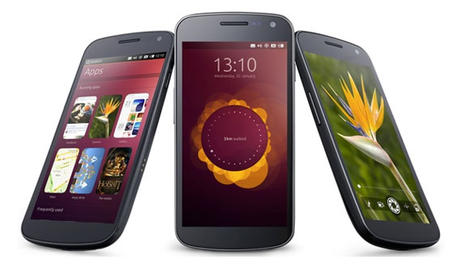 The Ubuntu Phone is far from dead. In fact, we've been promised that we can still expect to see the Linux OS go big in our smartphones in 2014
 According to the 'Mobile App Developer Survey 2013', done by Vserv.mobi, Android is the platform of choice for app developers entering the development scene.
 NEW DELHI: Search engine giant Google will unveil its 'Shoppable Hangout' in the country on January 20, which will allow users to interact with each other and shop online simultaneously.Google+ Shoppable Hangout On Air enables up to 10 people to interact with each other on a multi-person video chat that is broadcast live to millions online, while allowing all the viewers to simultaneously shop, chat and comment.
